Quick Answer: A Jura coffee machine has no sensor for the milk container. The Cool Control 1.0 l and 2.5 l coolers weigh the milk with built-in scales and report an empty container to the machine over a wireless link. If the level reads wrong, take the stainless steel container and its cover out, switch the cooler on, and hold the calibration button for about 3 seconds until it beeps. If the cooler reads correctly but the machine never hears from it, re-pair the Wireless Transmitter or WiFi Connect. The steps for both are below, taken from Jura’s instructions for use.
Repair Service
Cool Control and machine still not connected?
If the steps below do not restore the milk level display, a part may have failed. Tell us your machine, the fault, and your location. We look for a repair technician who covers your area. No obligation.
What Actually Detects the Milk?
Owners describe this fault in several ways: the machine “does not detect the milk container”, the cooler shows a red light with milk in it, or the machine never warns that the milk has run out. All of them come back to one mechanism, and it is not in the coffee machine.
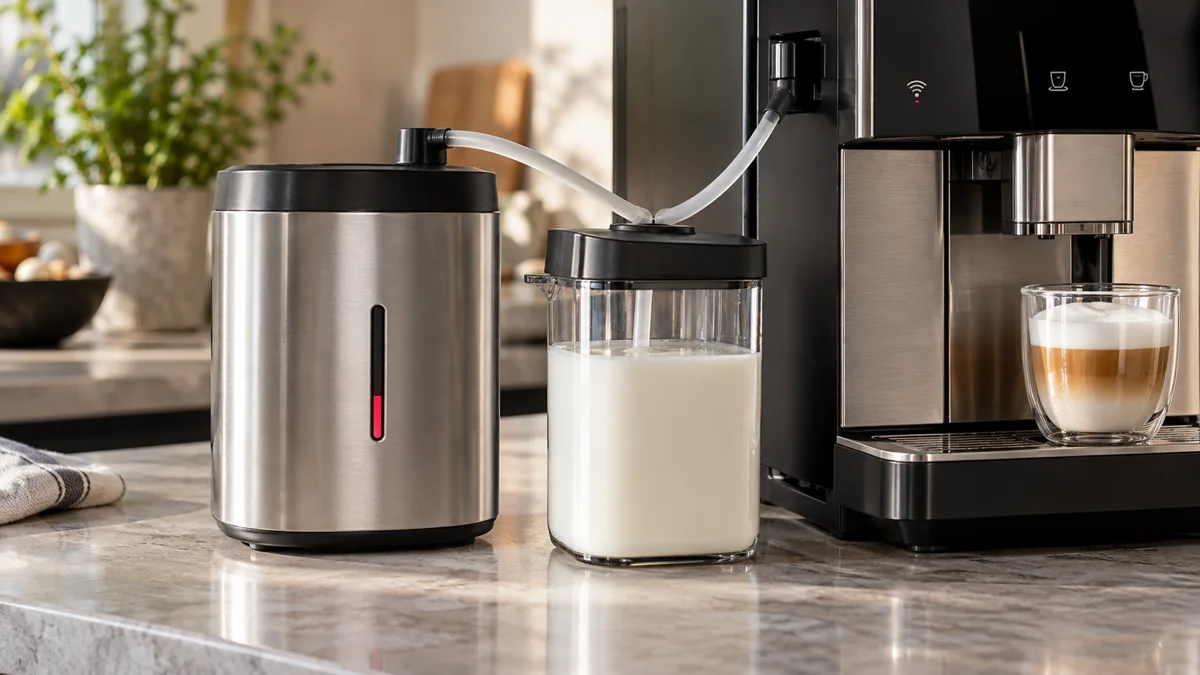
Jura’s Cool Control manual is explicit: “The milk level is calculated based on weight.” The Cool Control 1.0 l and 2.5 l contain built-in scales under the stainless steel container. There is no optical or float sensor in the milk. The cooler weighs the container and shows the result on its own milk level display. When the level runs low after a preparation, an acoustic signal sounds and the milk level display lights up red.
The coffee machine only learns about this if the cooler can talk to it. Jura documents two ways:
- Bluetooth: the optional Wireless Transmitter plugs into the Cool Control’s interface. The coffee machine must be fitted with Jura Smart Connect.
- WiFi: both the Cool Control and the coffee machine are fitted with Jura WiFi Connect.
With either link working, the manual states that an empty stainless steel container “is displayed in the coffee machine display”.
So a “milk container detection problem” is one of two faults. Either the scales are giving a wrong weight, or the wireless link between cooler and machine is down. The diagnosis below separates them.
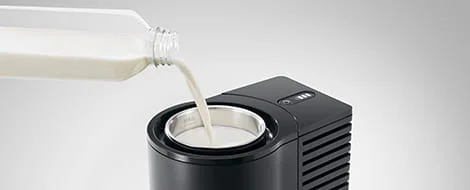
The Cool Control weighs the stainless steel container and its contents. The milk pipe carries milk only. Level information travels over the wireless link.
Which Jura Setups Have Milk Level Detection?
| Milk setup | Level detection | Reports to the machine |
|---|---|---|
| Carton or jug with the milk pipe | None | No |
| Jura glass milk container | None | No |
| Cool Control 0.6 l (US manual) | None documented | No |
| Cool Control 1.0 l | Built-in scales, level display on the cooler | Yes, with Wireless Transmitter or WiFi Connect |
| Cool Control 2.5 l | Built-in scales, level display on the cooler | Yes, with Wireless Transmitter or WiFi Connect |
Two points catch owners out.
First, Jura’s US instructions for the 0.6 l Cool Control describe a cooler with an On/Off button and nothing else. The setup section does not mention scales, a level display, or calibration. If you own that model, there is no detection to repair.
Second, the wireless accessory is optional. Jura’s US product page for the Cool Control 1.0 l says the Wireless Transmitter and the WiFi Connect are each “available as an option”. A Cool Control 1.0 l without one still shows the level on its own display, but the coffee machine will never show a milk message. That is normal, not a fault.
On the machine side, Jura says the Cool Control works with machines equipped with Smart Connect (through the Wireless Transmitter) or with WiFi Connect. The Z10 is the clearest example: its manual has a section titled “Connecting the Cool Control milk cooler wirelessly” and requires the WiFi Connect to be inserted into the machine’s service socket. For other models, check the connectivity section of your own instructions for use. The milk container guide compares the container types themselves.
Not Detected Right After Cleaning?
Many owners first see this fault straight after a clean. That fits the mechanism: cleaning is when the cooler gets moved, switched off and reassembled. Check these four things in order before you work through the full list below.
- Is the cooler switched on? If the LED on the Wireless Transmitter is off, the Cool Control has no power and cannot report anything. Switch it on and push the transmitter fully into its socket.
- Is it back on a firm, level surface? The scales only work on a firm horizontal surface. A drying mat, a towel or a wet tray under the cooler skews the weight reading.
- Is anything on the lid? Jura says nothing may sit on top of the Cool Control. A coiled milk pipe or a cloth left there after cleaning changes the reading.
- Did you calibrate with the container in place? If you recalibrated while reassembling, do it again with the stainless steel container and cover out (cause 1 below).
If the cooler reads correctly and the transmitter LED is lit steadily, but the machine still does not register it, the link has dropped. Go to causes 3 to 5. If the question is about the white cleaning container rather than the milk cooler, see our guide to the Jura milk cleaning container.
Diagnosis: Five Causes in Order of Likelihood
Start by reading the cooler, not the machine. Look at the milk level display on the Cool Control with a known amount of milk in the container.
- The cooler’s own display is wrong (red with milk in it, or never turns red when empty): go to causes 1 and 2.
- The cooler’s display is right, but the machine shows nothing or the wrong thing: go to causes 3, 4, and 5.
The order below is ours, based on how much each step costs to check. The steps themselves are Jura’s.
1. The scales have lost their calibration
This is the first fix Jura gives. Its manual says that if the milk fill volume is no longer displayed correctly, you must recalibrate the built-in scales. The procedure for the 1.0 l and 2.5 l:
- Remove the stainless steel container with its cover from the Cool Control.
- Press the On/Off button to switch the Cool Control on.
- Press the calibration button for about 3 seconds.
- An acoustic signal sounds. Calibration is complete.
- Put the container back, fill it with cold milk, and close it with the cover.
The key detail is step 1. The scales must be zeroed with the container out. Calibrating with a container of milk in place teaches the cooler the wrong zero point, and the level will read wrong from then on.
One trap: on these coolers the same calibration button, pressed briefly, switches the temperature display between °C and °F. If the temperature unit changes and nothing beeps, you did not hold the button long enough.
2. Something is disturbing the scales
Because the level is a weight reading, anything that changes the weight or the footing changes the reading. Jura’s manual names two conditions:
- The surface. “The built-in scales for calculating the milk level will only work on a firm surface.” The cooler must stand on a firm, horizontal surface. A towel, a rubber mat, or an uneven tray under the cooler will skew it.
- Objects on top. “Do not place anything on top of the Cool Control. This will interfere with the built-in scales for calculating the milk level.” Cups, the milk pipe coiled on the lid, or a cloth all count.
Clear the top, move the cooler to a hard level surface, and repeat the calibration from cause 1. Recalibrate after you move the cooler to a new spot.
3. The Wireless Transmitter is not connected
If the cooler reads correctly but the machine says nothing, look at the LED on the Wireless Transmitter. Jura’s instructions define three states:
| LED on the Wireless Transmitter | Meaning |
|---|---|
| Off | The Cool Control is switched off. The transmitter has no power. |
| Flashing once per second | Trying to establish a wireless connection. |
| Lit steadily | The connection to the coffee machine is established. |
An LED that is off points at the cooler. Switch the Cool Control on and check that the transmitter is pushed fully into the cooler’s interface.
An LED that keeps flashing means the two devices are not paired. Jura’s pairing procedure:
- Position the Cool Control near the coffee machine, a maximum of 0.5 m (about 20 inches) away.
- Switch on the Cool Control and the coffee machine.
- Press the reset button of the Smart Connect fitted in the coffee machine, for example with a paper clip.
- Within 30 seconds, press and hold the reset button of the Wireless Transmitter until the LED lights up. A steady LED confirms the connection.
Jura notes that some machines have an automatic connect function, described in the machine’s own manual. It also states that after a device is switched off and on again, the connection is re-established automatically. You should not need to pair every morning. If you do, treat it as cause 5.
4. The Smart Connect is already paired with the J.O.E. app
This one explains the cooler that “stopped being detected” on the day the app was set up. Jura states it twice, in the transmitter instructions and in the Cool Control manual: the Smart Connect in the coffee machine can connect with either one Cool Control or one Jura app. It has one slot.
If you paired your phone with the machine, the app took the slot and the cooler lost it. You have two options:
- Pair the Wireless Transmitter again using the steps in cause 3. The cooler gets the slot back and the app loses it.
- Use WiFi Connect on both devices instead, if your machine supports it. On the Z10, Jura’s manual shows the machine connected with the network “and/or Cool Control” through WiFi Connect.
Our J.O.E. app guide covers the app side of this choice.
5. The WiFi Connect link to the machine is not set up or has dropped
For a Z10 using WiFi Connect, Jura’s manual gives this sequence. The WiFi Connect must be inserted in the Z10’s service socket, and the Cool Control needs its own WiFi Connect.
- Press the Rotary Switch.
- Touch the Machine setting symbol.
- Touch “1/2” to go to the next page.
- Touch “Connect accessory”.
- Touch “Connect”. The display confirms with “Saved”.
The Z10’s cockpit shows the connection state. A white WiFi symbol means the Z10 is connected with the network, the Cool Control, or both. A red symbol means no connection to the WiFi network. If the symbol is red, fix the network side first with our Z10 WiFi connection guide.
For a link that was working and stopped, the Cool Control manual gives a reset. If you experience general problems with the Wireless Transmitter or WiFi Connect, such as a connection problem, it can be reset to the factory setting: press the Cool Control’s On/Off button for about 3 seconds. After a reset the accessory is unpaired, so run the pairing steps again.
What a Persistent Failure Means
Run the checks in order and note where they stop working. The result tells you which part is at fault.
The level display is still wrong after calibration on a firm, clear surface. You have done everything Jura’s manual offers for the scales. The manual has no further user step, and it says not to open or repair the cooler yourself. This is a service case for the Cool Control, not for the coffee machine.
The transmitter LED stays off while the Cool Control is on and cooling. By Jura’s own LED table, an unlit LED means the transmitter is not being supplied with power. With the cooler running, that points to the transmitter or the cooler’s interface. This is our reading of the table, not a statement from Jura. A second transmitter is the cheapest way to tell the two apart.
The LED flashes forever and pairing never completes. Check the distance (0.5 m maximum), the 30-second window, and that the app has not taken the Smart Connect slot. If all three are right, the fault is in the Wireless Transmitter or in the machine’s Smart Connect. If the J.O.E. app can still pair with the machine, the Smart Connect works and the transmitter is the suspect.
Everything pairs, and the machine still never reports an empty container. Jura’s manuals do not document a further setting for this. Contact Jura customer support with the cooler and machine model numbers.
None of these faults stops the machine from making milk drinks. The milk pipe works with no wireless link at all. If milk is not being drawn or the foam is poor, that is a different problem. Start with the milk frother troubleshooting guide.
Repair Service
Cooler and Machine Still Not Talking?
Tell us your machine model, your Cool Control size, and what the level display and transmitter LED do. We will look for an experienced Jura repair technician who covers your area. There is no obligation to proceed.
Repair or Replacement Accessory?
The parts involved differ a lot in cost, so identify the failed one before you buy anything.
- Wireless Transmitter (Jura article 24031). A small plug-in accessory. If the LED evidence points here, replacing it is simpler than a repair.
- Smart Connect or WiFi Connect in the machine. Also plug-in accessories. Test with the J.O.E. app before you replace one.
- The Cool Control itself. Scales that will not hold calibration are inside the cooler. Jura’s manual reserves repairs for its service network. A cooler under warranty should go back to Jura.
A wrong level reading does not by itself mean the cooling has failed. If the cooler still holds temperature, you can keep using it and check the level by lifting the cover. If you replace it, the 1.0 l model is the one with the level display and the wireless interface. Our Cool Control review covers whether it is worth the price.
The Cooler With Built-In Scales
Jura Cool Control 1 L
Milk level display on the cooler and an interface for the Wireless Transmitter or WiFi Connect. The wireless accessory is sold separately.
Two Habits That Prevent the Problem
Both come from the Cool Control manual.
Keep the top of the cooler clear and the cooler in one place. The scales read weight. A fixed, firm spot with nothing on the lid keeps the reading stable.
Do not top up endlessly. Jura says not to keep filling the container, because milk that has been in it for a long time can go sour, and to empty and clean the container and metal tube after use. Our guide on how long milk can stay in a Cool Control covers the hygiene side in full.
Frequently Asked Questions
How does a Jura machine detect the milk container?
It does not detect the container directly. The Cool Control 1.0 l and 2.5 l have built-in scales and calculate the milk level from weight. With a Wireless Transmitter or WiFi Connect fitted, the cooler tells the coffee machine when the stainless steel container is empty. A glass milk container or a carton has no such link.
Why does my Jura Cool Control show a red milk level light when the container is full?
The scales are out of calibration or something is disturbing them. Place the cooler on a firm horizontal surface with nothing on top. Remove the stainless steel container with its cover, switch the cooler on, and hold the calibration button for about 3 seconds until the signal sounds.
How do I pair a Jura Cool Control with the coffee machine?
With the Wireless Transmitter: place the cooler within 0.5 m of the machine, switch both on, press the reset button of the Smart Connect in the machine, and within 30 seconds press and hold the transmitter’s reset button until its LED stays lit. On a Z10 with WiFi Connect: Machine setting, second page, Connect accessory, Connect.
Why did my Cool Control stop talking to the machine after I set up the J.O.E. app?
The Smart Connect can connect with either one Cool Control or one Jura app. Pairing the app takes the only slot. Pair the Wireless Transmitter again, or move both devices to WiFi Connect if your machine supports it.
Does the Jura glass milk container or the 0.6 l Cool Control report milk level?
No. The glass container is a passive vessel. Jura’s US manual for the 0.6 l Cool Control lists no scales, no milk level display, and no calibration button. Milk level monitoring belongs to the 1.0 l and 2.5 l models.
What does the flashing LED on the Jura Wireless Transmitter mean?
Flashing once per second means it is trying to establish a connection. A steady LED means the connection to the coffee machine is established. No light means the Cool Control is switched off and the transmitter has no power.
Related
- Jura Milk Containers Explained - which container fits which machine
- Jura Cool Control Review - whether the cooler is worth it
- How Long Can Milk Stay in a Jura Cool Control? - storage and cleaning
- Jura Z10 WiFi Connection Problems - when the WiFi symbol is red
- Jura Milk Frother Not Working - when the problem is the milk, not the detection
As an Amazon Associate, we earn from qualifying purchases at no extra cost to you.