Jura machines communicate maintenance needs and errors through plain-text messages on the display. Most are routine prompts - not failures. This guide covers every common Jura message, what it means, and what action is needed. If your machine shows a symptom without any error message - a reset that will not take, the machine stuck on system filling, a drip tray warning that will not clear - the Jura troubleshooting quick-diagnosis table covers those cases. And if your machine shows an icon or pictogram rather than a text message, the Jura symbols and icons guide decodes every display symbol.
Routine Maintenance Messages
These messages appear on a predictable schedule. They are not faults - they are the machine doing its job of telling you what is needed.
”Fill Bean Container” / “Add Coffee Beans”
What it means: The bean hopper is empty or nearly empty.
What to do: Refill with fresh whole beans. If you just added beans and the message persists, check that the hopper lid is seated properly and that beans have fallen past the hatch. Run a test brew.
If the message stays on with a full hopper: this is the “fill bean container error” many owners hit - the usual cause is the bean gate, a small lever or rotating disc under the hopper that slips into the closed position when you handle the lid. Open it fully and press a brew button. Oily-bean residue on the bean sensor and compacted powder at the grinder outlet are the other common triggers. The Fill Bean Container error fix guide walks through every cause step by step.
Urgency: Low - the machine will not grind or brew until resolved.
”Fill Water Tank”
What it means: The water tank is empty or not seated correctly.
What to do: Remove, fill, and reseat the water tank. Make sure the tank clicks into place. If the message persists after refilling, remove the tank and check the water intake valve at the base for visible blockage.
Urgency: Low - the machine will not brew until resolved.
”Empty Drip Tray” / “Drip Tray Full”
What it means: The drip tray has reached capacity. Most Jura drip trays have a float indicator that rises with the water level.
What to do: Remove the drip tray, empty it, rinse, and replace. Check that the grounds container is not also full (see below) - both often need attention at the same time.
Urgency: Low - the machine continues to work but may overflow if not addressed.
”Empty Grounds Container” / “Dispose of Coffee Grounds”
What it means: The grounds container is full. Most Jura models collect 10-16 spent pucks before this message appears.
What to do: Remove the grounds container and empty it. Rinse if time allows. The machine will reset the counter automatically when you replace the container.
Important: Only remove the grounds container when the machine is on (not mid-brew). The machine tracks puck count electronically and needs to be powered on when you reinsert the container to reset the counter correctly. Removing it while off can cause a count mismatch.
Urgency: Low - but do not ignore for more than a day or two.
”Clean Machine” / “Cleaning Required”
What it means: The machine has reached approximately 200 brews since the last cleaning cycle. This is a scheduled maintenance prompt, not an error.
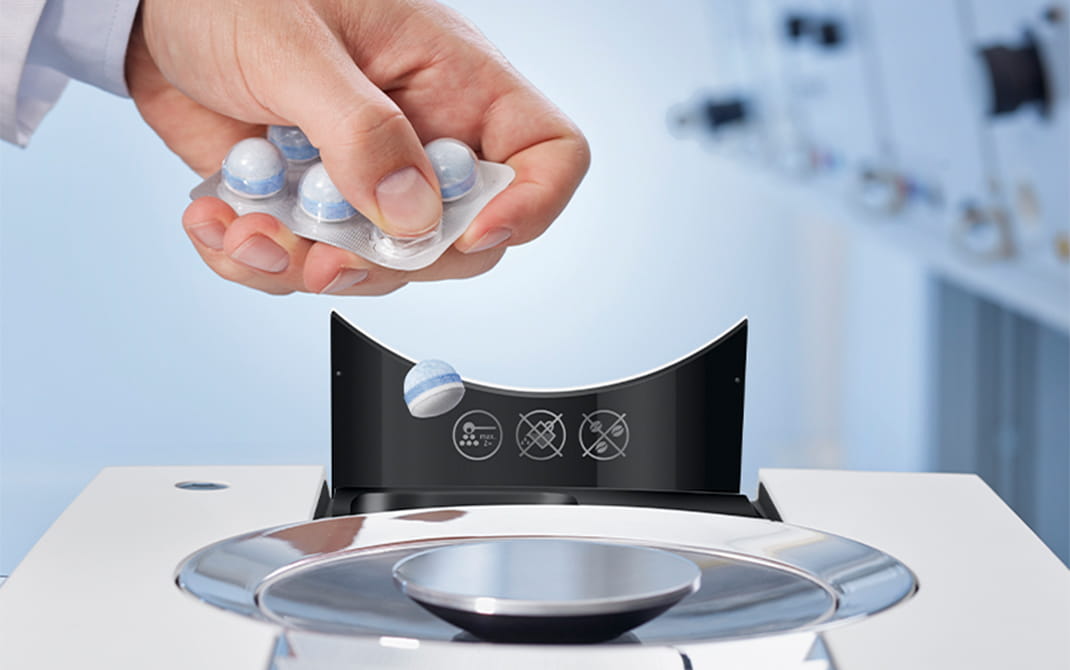
What to do: Run a cleaning tablet cycle. Place a Jura cleaning tablet in the tablet drawer (not the bean hopper), hold a container under the spout, and follow the on-screen instructions. The cycle takes around 10 minutes.
What happens if you ignore it: Coffee oil residue accumulates on the brewing unit seals and piston, accelerating wear. Consistent cleaning is the single most important thing you can do for long-term machine health.
Urgency: Medium - do not ignore for more than a few days.
Cleaning Tablets
Jura Cleaning Tablets
Always use Jura-branded tablets. Third-party tablets can leave residue in fine channels and are not calibrated for Jura’s cleaning cycle timing.
“Descale Machine” / “Descaling Required”
What it means: The machine’s water hardness sensor and cycle counter have determined it is time to descale. This appears every 2-3 months depending on your water hardness setting.
What to do: Run a full descaling cycle. Use Jura descaling tablets dissolved in 1 liter of water. Follow the on-screen instructions - the cycle is fully automated and takes approximately 30 minutes. Have a 1.5-liter container ready to collect the rinse water.
What happens if you ignore it: Scale accumulation in the boiler and flow channels is the leading cause of Jura machine failure. Chronic scale buildup eventually burns out heating elements and restricts the pump. See How Long Do Jura Machines Last? for detail.
Urgency: High - run the descaling cycle as soon as practically possible.
Descaling Tablets
Jura Descaling Tablets
Formulated specifically for Jura’s boiler chemistry. Avoid multi-brand descalers - the acid concentration may differ.
“Replace Filter” / “Water Filter Required”
What it means: The CLARIS water filter has reached its capacity (typically 50 liters or 2 months of use).
What to do: Remove the old filter from the water tank, insert a new CLARIS filter, fill the tank, and reset the filter counter through the machine’s Settings menu.
Why it matters: The CLARIS filter softens water and filters chlorine. Chlorine degrades rubber seals over time. A depleted filter means the machine is processing increasingly unfiltered water.
Urgency: Medium.
Replace Now
Jura CLARIS Water Filter (~$17)
Softens water and filters chlorine. Keeps limescale out of the boiler and protects internal seals. Replace every 2 months.
If the CLARIS filter is stuck in the tank: Filters can swell slightly if left in dry conditions or used past their expiry. To remove a stuck filter: empty the water tank completely, then grip the filter firmly at the base (not the top tab) and pull straight up with steady pressure - do not twist. If still stuck, fill the tank with warm water and wait 10 minutes before trying again. Never use tools to pry it out as this can crack the tank lining. On the ENA 8, the tank is side-mounted - tilt it slightly outward before pulling the filter to give clearance.
”Rinse Milk System” / “Clean Milk System”
What it means: This prompt appears after each milk-based drink. It is a 15-second automated rinse cycle.
What to do: Follow the on-screen prompt - the machine will run hot water through the milk path. Do not skip this step. Milk residue dries quickly and can clog the milk system.
Urgency: High - always complete milk rinses immediately.
”Clean Milk System” (longer cycle)
What it means: A more thorough milk system cleaning is due. This prompt appears every few months.
What to do: Use Jura milk system cleaner (or the capresso-compatible equivalent) and follow the on-screen instructions. This dissolves protein buildup that the rinse cycles cannot address.
Urgency: Medium - complete within a day or two of the prompt.
Error Codes and Fault Messages
These indicate a potential fault, not just a routine maintenance need.
”Brewing Unit Error” / “Error 8” / “Remove Brewing Unit” (all models including ENA 8)
What it means: The brewing unit has not completed its movement correctly. This can be caused by:
- A puck stuck in the brewing unit
- Excess grounds buildup
- Worn brewing unit seals causing increased friction
What to do:
- Power off the machine.
- Open the service door and remove the brewing unit.
- Rinse the brewing unit thoroughly under warm running water (do not use soap). Use a soft brush to clear any stuck grounds.
- Inspect the piston seals for visible damage or cracking.
- Reinsert the brewing unit and power on.
If the error persists after cleaning, the brewing unit seals may need replacement. Contact Jura service. Full diagnosis, part prices, and US repair costs: Jura Error 8 guide.
Urgency: High - do not attempt to force brews through a brewing unit error.
”Error 16” (GIGA family only)
What it means: The ceramic multi-way valve cannot position or initialize - the GIGA-line equivalent of Error 6 on home models. It does not appear on E, S, Z, or ENA machines.
What to do: Power-cycle once. If it returns, the valve or its drive needs a technician. Causes, parts, and repair costs: Jura Error 16.
Urgency: High - the machine will not brew until the valve initializes.
”Grinder Error” / Unusual Grinding Noise
What it means: The grinder has encountered resistance it cannot overcome. Common causes:
- A hard foreign object (pebble, bolt fragment) in the beans
- Severely worn burrs causing clumping under the grinder
- Too fine a grind setting for the bean type causing compaction
What to do:
- Empty the bean hopper completely.
- Look inside the hopper for any foreign objects.
- Run a grinder cleaning program (check your model’s settings menu).
- If you set the grind very fine, coarsen it by 2-3 steps and try again.
- If the grinding noise persists with no foreign object found, contact Jura service - burrs may need inspection.
Urgency: High - do not run the grinder repeatedly if it is making unusual sounds.
Machine Not Heating / Cold Coffee
What it means: The machine is not reaching operating temperature before brewing.
What to do:
- Check if the machine is fully powered on and has completed its warmup sequence.
- Run a blank rinse cycle (water only, no coffee) to check if hot water flows.
- If water runs cold, the heating element or pump may be faulty.
- Run a descaling cycle if overdue - severe scale on the boiler is a common cause of heating issues.
Urgency: High if water runs cold - contact Jura service if descaling does not resolve it.
Water Leaking from Base
What it means: Internal tubing, brewing unit seals, or the drip tray overflow are leaking internally.
What to do:
- Check the drip tray - it may simply be overfull.
- Inspect the water tank seating - a misaligned tank can cause leaks.
- If the drip tray is empty and the leak continues, power off the machine and contact Jura service. Internal seal failure requires professional repair.
Urgency: High - power off and do not use until inspected.
What does Error 2 mean on a Jura coffee machine?
Error 2 means the coffee temperature sensor signal was interrupted, and the most common trigger is a machine that is simply too cold - not a failed part. It shows up predictably on machines that were shipped in winter, stored in a garage, or left in an unheated vacation home. Let the machine sit at room temperature for one to two hours, or speed things up by removing the water tank and blowing warm air from a hair dryer into the tank cavity for about five minutes, then power on again. If Error 2 keeps appearing on a machine that is already at normal room temperature, the thermoblock temperature sensor itself has likely failed - that is a job for a Jura authorized repair center, not a DIY fix, since it sits behind pressurized hot-water components. Full walkthrough: Jura Error 2 guide.
What does Error 5 mean on a Jura?
Error 5 is a heating fault: the thermoblock is not reaching its required brewing temperature. First, unplug the machine, wait five minutes, and plug it back in - a one-off electronic glitch sometimes clears this way. If the error returns, heavy scale insulating the heating element is the most frequent underlying cause, so run a full descaling cycle if one is overdue. A persistent Error 5 after descaling points to a failed heating element or its sensor, which requires professional replacement. On an older machine, get a repair quote first and weigh it against the repair-vs-replace math before committing - heating element jobs are among the pricier Jura repairs. Full walkthrough: Jura Error 5 guide.
What does Error 6 mean on a Jura?
Error 6 indicates a valve fault: the machine cannot confirm the position of the internal valve that switches the water path between coffee, hot water, and steam. Start with a full power cycle - off, unplugged for five minutes, then back on. Scale deposits jamming the valve are a common root cause, which is why this error often appears on machines that have skipped descaling prompts; if yours is overdue, descale before assuming a hardware failure (how often descaling is actually due depends on your water hardness setting). If Error 6 survives both the power cycle and a descale, the valve or its drive motor needs professional service. Part prices by model: Jura Error 6 guide.
What do Error 3, Error 10, and Error 12 mean on a Jura?
Error 3 is a steam-system heating fault, Error 10 is a heater overheating fault triggered by mains interference, and Error 12 is a grinder initialization fault on GIGA machines. In more detail: Error 3 means the steam thermoblock is not reaching its required temperature or its sensor is reading out of range - the same family of causes as Error 5, so power cycle first and descale if overdue (Error 3 guide). Error 10 on the E6, E8, J6, WE8, and X8 means the heater ran hot after the machine received interference pulses from the power supply; move the machine to a different outlet with a surge protector before assuming hardware failure (Error 10 guide). Error 12 on GIGA machines signals the left grinder could not initialize - empty the hopper, check for a foreign object, and coarsen the grind. Milk system stepper faults on the E and WE series show as Error 15, and a CLARIS Smart filter that cannot be read shows as Error 22. Exact meanings vary by model range, so check your manual; if any of these codes returns immediately after a power cycle, book a Jura authorized repair center rather than forcing brews.
Why does my Jura say “Not Enough Milled Coffee”?
The machine did not detect enough ground coffee reaching the brewing unit, and the usual culprit is a grinder outlet packed with fine compacted powder or a grind setting that is too fine. Empty the bean hopper, brush out any visible clumped grounds below the burrs, and coarsen the grind by two to three steps - always adjust the grind setting while the grinder is running, never on a stopped grinder. If you use the pre-ground bypass chute, add no more than two level scoops per brew and avoid espresso-fine grounds, which can block the funnel; brush the chute dry rather than rinsing it. After clearing a blockage, run one or two brews to let dosing normalize before judging the fix, and give the brew unit a cleaning if grounds have spilled inside the housing.
How do I clear an error code on a Jura machine?
Most numbered Jura errors clear with a full power cycle: switch the machine off, unplug it from the wall, wait five minutes, and plug it back in. There is no hidden button-combination master reset on current models - anything a power cycle cannot clear is being re-triggered by a real condition the machine is detecting. Maintenance prompts like Clean, Descale, or Replace Filter are different: they cannot be dismissed and only clear once the requested program has actually completed, which is by design (the schedule exists to protect the machine, as the Jura cleaning schedule explains). If a numbered error returns immediately after a power cycle, treat it as a hardware fault and stop forcing brews - the troubleshooting quick-diagnosis table helps narrow down which component is responsible.
Repair Service
Need a Jura Repair Technician?
Tell us your machine, the problem, and your location. We will look for an experienced repair technician who covers your area. There is no obligation to proceed.
What a remote diagnosis looks like
Remote video diagnosis
The video call went very well, prompt and Al had already done his homework on the Z10, researched what the problem might be and he had a few questions. He thinks I need a new grinder for the beans. He seemed very knowledgeable and yes I would recommend him for a diagnosis.
Quick Reference
| Message | Type | Urgency | Action |
|---|---|---|---|
| Fill bean container | Routine | Low | Add beans |
| Fill water tank | Routine | Low | Refill and reseat tank |
| Empty drip tray | Routine | Low | Empty and rinse |
| Empty grounds container | Routine | Low | Empty when powered on |
| Clean machine | Maintenance | Medium | Run cleaning tablet cycle |
| Descale machine | Maintenance | High | Run descaling cycle |
| Replace filter | Maintenance | Medium | Install new CLARIS filter |
| Rinse milk system | Routine | High | Complete immediately after milk drinks |
| Error 1 | Fault | High | Power cycle; sensor or fuse service if it persists - Error 1 guide |
| Grinder error | Fault | High | Check for foreign objects, contact service if persists |
| Error 2 | Fault | Medium | Warm machine to room temperature; service if it persists - Error 2 guide |
| Error 3 | Fault | High | Power cycle, descale; service if it persists - Error 3 guide |
| Error 5 | Fault | High | Power cycle, descale; service if it persists - Error 5 guide |
| Error 6 | Fault | High | Power cycle, descale; valve service if it persists - Error 6 guide |
| Error 7 | Fault | High | Second ceramic valve (Z, X, J); brew group on Impressa 500 and Ultra - Error 7 guide |
| Error 8 / Brewing unit error | Fault | High | Power cycle, empty grounds, cleaning cycle; brew group service if it persists - Error 8 guide |
| Error 10 | Fault | Medium | Heater overheated from mains interference; change outlet, add surge protector - Error 10 guide |
| Error 12 | Fault | High | Grinder initialization (GIGA); check for foreign objects; service if it persists |
| Error 15 | Fault | High | Milk system stepper motor; disconnect milk hose, power cycle, clean milk system - Error 15 guide |
| Error 22 | Fault | Low | CLARIS Smart filter not recognized; reseat or replace the filter - Error 22 guide |
| Not enough milled coffee | Fault | Medium | Clear grinder outlet, coarsen grind 2-3 steps |
Related
Single error code guides: Error 1 | Error 2 | Error 3 | Error 5 | Error 6 | Error 7 | Error 8 | Error 10 | Error 15 | Error 22
- Jura Cleaning Schedule - when to do what
- How Long Do Jura Machines Last? - maintenance impact on lifespan
- Jura Z10 WiFi Connection Problems - Z10 app issues