The J.O.E. (Jura Operating Experience) app lets you control your Jura machine from your phone. You can start a drink remotely, customize drink parameters, get maintenance reminders, and track usage data. Here is what it actually does in practice and which machines support it.
Which Jura Models Support J.O.E.
| Model | WiFi | J.O.E. Support | Notes |
|---|---|---|---|
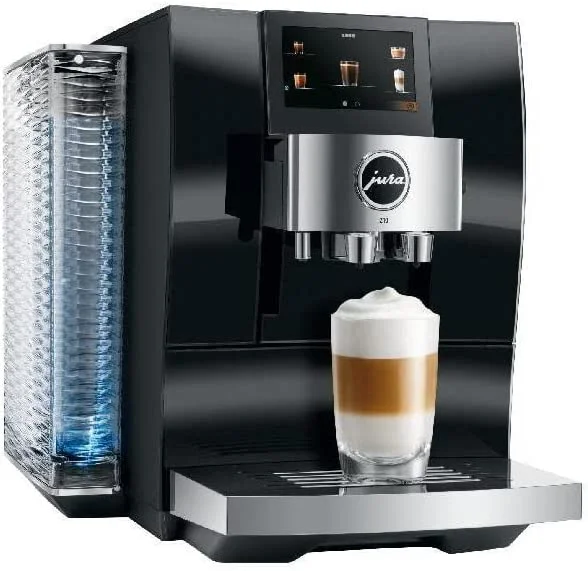
| Jura Z10 | Built-in | Yes | Native, no adapter needed |
| Jura S8 | Built-in | Yes | Native, no adapter needed |
| Jura J8 | Built-in | Yes | Native, no adapter needed |
| Jura WE8 | Built-in | Yes | Native, includes fleet management features |
| Jura E8 | No (adapter needed) | Yes with adapter | Requires Jura WiFi Connect (~$35) |
| Jura ENA 4 | No | No | No WiFi support |
| Jura E6 | No | No | No WiFi support |
| Jura D6 | No | No | No WiFi support |
The E8 can use J.O.E. but requires purchasing a separate WiFi Connect adapter. On premium models (Z10, S8, J8, WE8), WiFi is built in.
How to Set Up J.O.E.
Step 1 - Download the app J.O.E. is available on iOS and Android. Search “Jura Operating Experience” in the App Store or Google Play.
Step 2 - Enable WiFi on your machine On models with built-in WiFi (Z10, S8, J8, WE8): go to Settings > WiFi on the machine display. On the E8 with adapter: connect the WiFi Connect adapter to the machine’s accessory port first.
Step 3 - Connect to your network The app walks you through connecting the machine to your home WiFi network. You will need your network password. The machine creates a temporary access point during setup - connect your phone to it, then transfer your home network credentials. The process takes about 3-5 minutes.
Step 4 - Pair your account Create a J.O.E. account and pair it with your machine. This stores your personal drink settings in the cloud, which is useful if you replace your machine or reset it.
Troubleshooting setup: If the connection fails, check that your router is set to 2.4GHz network (the Z10 and S8 connect on 2.4GHz, not 5GHz). See our Jura WiFi troubleshooting guide for detailed connection fixes.
What J.O.E. Actually Does
Remote brewing
You can start a drink from your phone while the machine is warming up - useful for starting your coffee from bed before getting up, or starting a drink in the kitchen while finishing a meeting. The machine must be powered on and in standby for remote start to work.
You can also send a drink command when you leave the office: “start a lungo in 10 minutes” so it is ready when you arrive.
Custom drink programming
This is the most useful feature for regular users. For each drink specialty, you can adjust:
- Volume (e.g., set your cappuccino to 180ml instead of the default 160ml)
- Strength (1-10 scale)
- Temperature (low/medium/high/extra high on supported models)
- Foam density (for milk drinks: thin/medium/thick)
Changes made in the app sync to the machine and are saved per user profile. This means a 2-person household can have fully different settings for “my espresso” and “your latte” without sharing a generic machine profile.
Personal profiles
Create up to 8 user profiles on most models. Each profile saves custom settings for each drink type. You switch profiles via the app or on the machine display. Useful for households where different people have different preferences.
Maintenance tracking
The app shows the maintenance status of your machine - how many cups until the next cleaning cycle, descaling reminder countdown, water filter status. It sends push notifications when maintenance is due, which is more reliable than remembering to check the machine display.
For the WE8 in an office context, the app adds consumption analytics: total drinks per day, most popular specialty, which user accounts use the machine most. Useful for facilities management.
Product store
The app includes a link to Jura’s accessory store. This is primarily a marketing feature - not a reason to use the app, but it is there.
Personal Profiles: Setting Up Multiple Users
The personal profiles feature is underused. Here is how to get the most from it:
- In the app, go to Profile > Create New Profile
- Name it (e.g., “Morning espresso” or your name)
- Customize each drink you regularly make - strength, volume, temperature, foam density
- Save and sync to the machine
Once profiles are set up, switching between them on the machine display takes 2 seconds. Each person in a 2-4 person household gets their exact drink without adjusting settings every morning.
Does J.O.E. Work Without WiFi?
Partially. The machine operates completely normally without an app or WiFi connection. All 17-32 specialties are available through the physical display. You only lose:
- Remote start
- App-based settings changes
- Push notifications for maintenance
- Cloud profile backup
If your router is down or you are traveling, your machine works fine without J.O.E.
Is J.O.E. Worth Using?
The honest answer: it depends on your habits.
J.O.E. is worth it if:
- You have strong preferences for specific drink parameters and want them saved
- Multiple people use the machine with different preferences
- You want maintenance reminders on your phone rather than checking the machine
- You use the remote start feature regularly (common in households with long warm-up routines)
J.O.E. adds less value if:
- You make one or two standard drinks daily and do not customize settings
- You are the only person using the machine
- You find app-based control of an appliance unnecessary
The remote start feature alone is useful enough that most WiFi-capable machine owners end up using it regularly. The profile system is genuinely valuable for multi-person households.
Built-In WiFi
Jura S8
Native J.O.E. support, 4.3” touchscreen, HP3 fine foam. No adapter needed.
Check S8 Price →Flagship with J.O.E.
Jura Z10
Full J.O.E. support plus cold brew, P.R.G. grinder, 32 specialties.
Check Z10 Price →FAQ
Does J.O.E. work on the Jura E8? Yes, but you need the Jura WiFi Connect adapter (~$35), sold separately. Once connected, the E8 supports all J.O.E. features except the app-based touchscreen functions available on S8 and Z10.
Can I use J.O.E. away from home? Remote start and notifications work over the internet, not just local WiFi. As long as your machine and phone are both connected to the internet, remote control works from anywhere.
How many devices can connect to one machine? Multiple devices can connect to one machine through the J.O.E. app. Each family member or office user can have the app on their phone linked to the same machine.
Does the app work on both iPhone and Android? Yes. J.O.E. is available on iOS 12+ and Android 5.0+.
What if I change my WiFi router or password? You will need to reconnect the machine to your new network. Go to Settings > WiFi on the machine display and re-enter your credentials.
See also: Jura Z10 WiFi Connection Problems | Jura Z10 Review | Jura S8 Review | Jura J8 Review